
Draw an ERD by extracting entities from the requirements, defining their relationships, choosing keys and then applying a notation. The same basic sequence works for coursework and production design.
The forum example below applies each step and ends with runnable DDL and a checklist for reviewing the result.
Step 1: Pull entities out of the requirements
When you're staring at a blank page, start by circling the nouns.
A member writes posts. A post receives comments. Each post belongs to one category.
Member, post, comment, category. Those are the candidates.
Not every noun survives, of course. The test is simple: if you store many of them and need to tell them apart, it's an entity; if it's a single value describing something else, it's an attribute.
Run the nouns you'd meet in real requirements through that test and you get something like this:
| Noun | Verdict | Why |
|---|---|---|
| Member, post, comment | Entity | Many rows accumulate and each must be identified |
| Category | Entity | Managed as its own list, shared by many posts |
| Title, created date | Attribute | A single value describing one post |
| Comment count | Neither | An aggregate you can compute — storing it means maintaining it |
Values you can compute, like a comment count, stay out by default. Storing them for performance is denormalization, and that can wait until the need is proven.
Roles like "admin" sit in the same gray zone. If there are only a few role values with no data attached, a role column on members is enough. The moment each role starts carrying its own data — a permission list, say — promote it to an entity.
This is the mistake I see most often in design reviews: category never becomes its own entity and ends up as category VARCHAR(50) inside the posts table. It works fine at first, which is exactly why nobody notices.
Then one day someone renames a category, you're running an UPDATE across tens of thousands of posts, and the lesson finally lands. When many rows share the same value, treat it as a signal to split.
Step 2: Pin down relationships and cardinality
With the entities in hand, look at the verbs. "Writes," "receives," and "belongs to" each become a relationship. For each one, decide how many rows correspond on either side.
- One member writes many posts → member 1 : N post
- One post receives many comments → post 1 : N comment
- One category contains many posts → category 1 : N post
Posts and tags are a different story: both sides can have many. Relational databases can't store many-to-many directly, so you add a junction table like post_tags and split it into two one-to-manys. This comes up in interviews constantly, so remember the why, not just the trick.
The part people skip is the minimum. A post can exist with zero comments, so from the post's side, comments are 0..N. It looks like a detail, but it's what later decides your NOT NULL constraints and whether you reach for a LEFT JOIN.
Going further: three variations you'll meet early
One-to-one. Some relationships map exactly one to one, like a member and their profile. You'll reach for 1:1 to separate hot login data from rarely-read bios and settings, or to isolate sensitive data behind different access rules. That said, if your diagram is full of 1:1 lines, first ask whether you've split tables that wanted to stay together.
Many-to-many with attributes. The moment post_tags gains "tagged at" or "tagged by," the junction table stops being a mere connector and becomes an entity with meaning of its own. When that happens, give it a real name instead of a mechanical A_B compound.
Self-referencing. Threaded replies are the classic case. Add a parent_id to comments that references the same table, and allow NULL for top-level comments. We left it out of this walkthrough for simplicity, but on a real forum you'll meet it almost immediately.
Step 3: Settle attributes and keys
Don't overthink primary keys: use a surrogate id. Here's what happens if you make email the key — the moment a user changes their address, everything that referenced it has to change with it.
The counterargument is "what about keys that never change, like ISBNs?" In practice, "never" breaks more often than you'd expect. A UNIQUE constraint on email keeps the duplicate protection without the fragility.
In a 1:N relationship, the foreign key goes on the N side. Member 1 : N post means the posts table carries member_id. A 1:1 relationship instead places the FK on the dependent or optional side and uses UNIQUE to enforce a single reference, so "always on the N side" is not a universal rule.
Junction table keys come in two flavors. A composite primary key (post_id, tag_id) structurally blocks duplicate pairs; a separate id with a UNIQUE constraint on the pair makes the row easier to reference from other tables. Neither is wrong — decide by whether anything else will ever point at that row.
Data types can stay rough for now. Tuning lengths and indexes goes faster once the design has been through one full pass.
A design isn't finished until you've decided deletion
Once the relationships are drawn, there's a question to ask of every single one: "when the parent goes away, what happens to the children?"
If a member deletes their account, should their posts and comments vanish too? Careless ON DELETE CASCADE is behind more than a few incidents where deleting one member silently wiped their posts and every comment under them.
The safe default is RESTRICT, with CASCADE spelled out only where children genuinely must be removed with the parent. For a forum, soft deletion — flagging the member inactive instead of deleting the row — is a common alternative.
How to read crow's foot (IE) notation
There are more notations out there than anyone needs. In practice, you'll almost only ever meet IE — crow's foot. The symbols at the end of each line encode cardinality:
|— exactly one○— zero (optional)- Crow's foot (three prongs) — many
Real line endings combine two of these. |○ reads "zero or one," |< reads "one or more," and ○< reads "zero or more."
Practice on our forum:
- Member ─ post:
||on the member end,○<on the post end — "every post belongs to exactly one member; a member may have no posts or many" - Category ─ post: same shape — "every post sits in exactly one category"
Solid lines mark identifying relationships and dashed lines non-identifying ones — but reading the crow's feet correctly matters before that distinction does. For reference: coursework sometimes asks for Chen notation with its diamond relationship symbols, and Oracle-flavored documents use Barker. You'll rarely draw either, but being able to read them helps. The full symbol set and a three-notation comparison, with reading drills, is in our ERD notation guide.
One more habit worth starting now: keep two sets of names. A logical name for humans ("Member") and a physical name for the database (members) let designers and developers talk over the same diagram. It's why ERD tools ship separate Logical and Physical views.
Practice: the forum schema as DDL
Here's everything above as MySQL DDL. Copy it and run it as is.
CREATE TABLE members (
  id         BIGINT AUTO_INCREMENT PRIMARY KEY,
  email      VARCHAR(255) NOT NULL UNIQUE,
  nickname   VARCHAR(50)  NOT NULL,
  created_at DATETIME     NOT NULL DEFAULT CURRENT_TIMESTAMP
);

CREATE TABLE categories (
  id   INT AUTO_INCREMENT PRIMARY KEY,
  name VARCHAR(50) NOT NULL UNIQUE
);

CREATE TABLE posts (
  id          BIGINT AUTO_INCREMENT PRIMARY KEY,
  member_id   BIGINT NOT NULL,
  category_id INT    NOT NULL,
  title       VARCHAR(200) NOT NULL,
  content     MEDIUMTEXT   NOT NULL,
  created_at  DATETIME     NOT NULL DEFAULT CURRENT_TIMESTAMP,
  CONSTRAINT fk_posts_member   FOREIGN KEY (member_id)   REFERENCES members (id),
  CONSTRAINT fk_posts_category FOREIGN KEY (category_id) REFERENCES categories (id)
);

CREATE TABLE comments (
  id         BIGINT AUTO_INCREMENT PRIMARY KEY,
  post_id    BIGINT NOT NULL,
  member_id  BIGINT NOT NULL,
  content    TEXT     NOT NULL,
  created_at DATETIME NOT NULL DEFAULT CURRENT_TIMESTAMP,
  CONSTRAINT fk_comments_post   FOREIGN KEY (post_id)   REFERENCES posts (id),
  CONSTRAINT fk_comments_member FOREIGN KEY (member_id) REFERENCES members (id)
);
A few of these choices are deliberate:
- Posts and comments use BIGINT ids while categories use INT — tables that grow at different speeds don't need the same key size.
- Post bodies are
MEDIUMTEXT— TEXT's 64KB cap arrives sooner than you'd think for long-form content. TEXT is plenty for comments. created_at DEFAULT CURRENT_TIMESTAMP— even if the application forgets, the record remembers.- MySQL (InnoDB) automatically indexes foreign key columns, so the everyday "posts by member" lookup is covered without extra work.
posts.member_id is the N-side foreign key of member 1 : N post. If any foreign key doesn't line up with a relationship from step 2, you've drawn a picture, not a design.
A self-review checklist before you move on
Design done? Put the diagram in front of you and check just these. Even without a reviewer, these six kinds of checks catch the big accidents.
- Does every table have a primary key?
- Are 1:N foreign keys on the N side, and do 1:1 foreign keys have the intended UNIQUE and NULL rules?
- Is any N:M still sitting there without a junction table? A comma-separated list inside one column is the warning sign.
- Are you storing anything you could compute?
- Is naming consistent — singular vs. plural, case, separators?
- Did you decide a deletion policy for every relationship?
Which tool should you draw with?
A whiteboard is a fine way to start. The trouble comes after.
Keep maintaining the diagram in a general-purpose drawing tool and it slowly drifts away from the real schema, until nobody trusts the picture anymore. That's why a dedicated ERD tool — column-level connections, DDL in and out — ends up being the comfortable choice, doubly so once the diagram needs to be shared and reviewed by a team.
The free online ERD tools comparison lays out the privacy settings, table limits and export conditions for browser-based options.
If you already have DDL like the schema above, pasting it into WorksCove ERD builds the forum diagram for you.
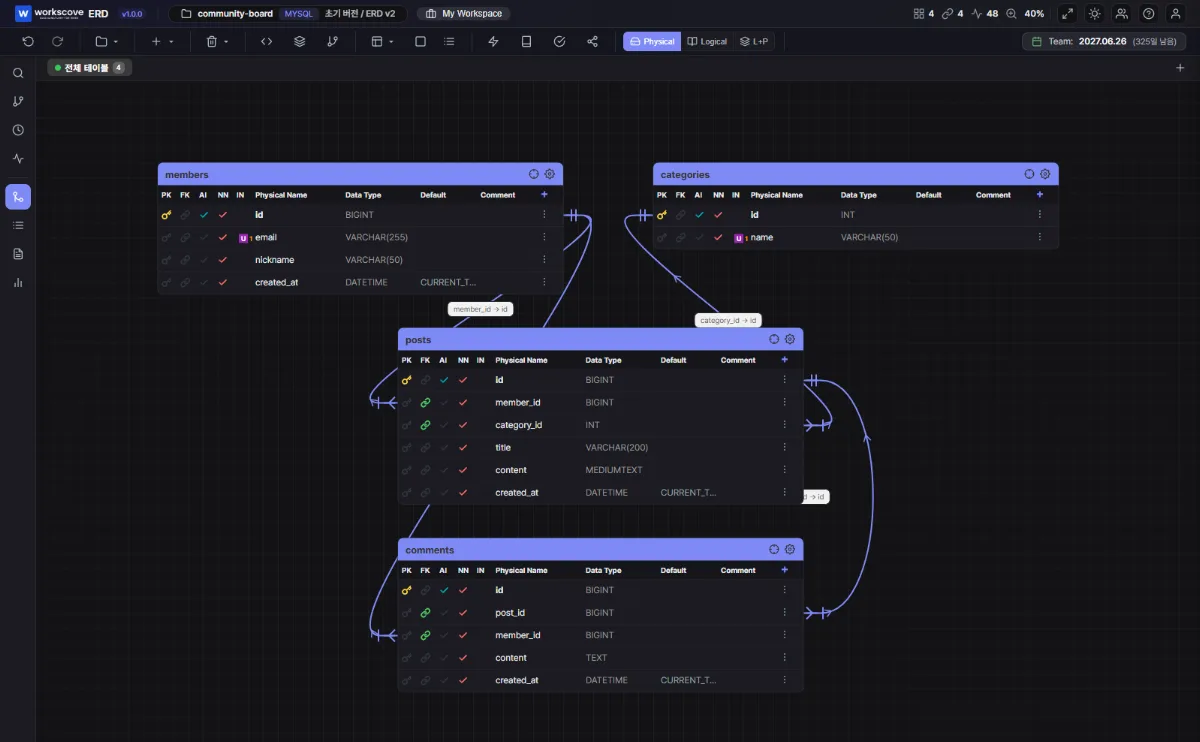
When the diagram and DDL are maintained separately, every schema change has to be applied twice. A missed update leaves two different versions of the schema structure. WorksCove ERD keeps the diagram and table specification in the same DDL import and export workflow.
FAQ
Which ERD notation should I use?
IE (crow's foot) notation is the de facto standard in practice. Unless a course specifically requires Chen notation, draw with crow's foot.
How do I model a many-to-many relationship?
Relational databases cannot store N:M directly. Create a junction table that holds both primary keys as foreign keys, and split the relationship into two 1:N relationships.
Should table names be singular or plural?
Consistency within the team matters more than the choice itself. Plural names (members, posts) are slightly more common in practice because they rarely collide with reserved words like user. Either way, never mix both styles in one project.
I already have a running database. Do I need to draw the ERD from scratch?
No. Export the DDL and paste it into an ERD tool to generate the diagram automatically. Tools with reverse engineering can also connect to the database and import the schema directly.
Apply the same entities → relationships → keys → notation sequence to the current project's requirements to produce a first schema draft.
When you're ready for what comes next, two topics follow naturally: normalization, which decides how far to split your tables, and table specification automation, which turns the finished schema into documentation.