
A table specification has no single standard format. Most review processes still expect physical and logical column names, data type and length, nullability, default value, keys and constraints, and a description.
The forum example fills those fields, then checks the mismatches commonly found in hand-maintained specifications. The final sections generate the same document from DDL.
What belongs in the specification
A specification has two halves: a summary of the table itself, and the definition of every column.
The table summary carries the physical name (members), the logical name (Member), a description, and sometimes the character set. Many templates also include author and last-modified columns, but those fields become stale unless the update process explicitly maintains them.
Column definitions are the substance. What reviewers actually read:
- Column name, physical and logical
- Data type with length —
VARCHAR(255), not just "string" - Nullability
- Default value
- Keys and constraints — PK, FK, UNIQUE, indexed
- Description — one line on why the column exists
Each field carries more meaning than it looks. Nullability isn't just a technical attribute — it's a business rule on record. "Can a member exist without a phone number?" The answer lives in that column. The default value shows what the database supplies when an insert omits the column. A blank cell only means there is no database default. Omitting a nullable column can produce NULL, while omitting a required column can fail, so read this field together with nullability. For the key column, settle on short codes — PK, FK, UK, IX — and the table stays scannable. The criteria behind those nullability and type decisions are laid out field by field in Database Table Design Checklist.
Add an index list and a foreign key list (which table and column each FK references, and what happens on delete) as table-level appendices, and the document is complete. We'll see both in the template below. How those FK relationships read as diagram symbols is covered in the ERD notation guide.
A template you can copy
Let's fill the format with the forum database we designed in How to Draw an ERD. First the simplest table, members.
Table: members (Member): registered service accounts
| # | Column | Logical name | Type | Null | Default | Key | Description |
|---|---|---|---|---|---|---|---|
| 1 | id | Member ID | BIGINT | N | AUTO_INCREMENT | PK | Surrogate key |
| 2 | VARCHAR(255) | N | — | UK | Login account, can change | ||
| 3 | nickname | Nickname | VARCHAR(50) | N | — | — | Shown in the UI |
| 4 | created_at | Signup time | DATETIME | N | CURRENT_TIMESTAMP | — | DB records it if the app forgets |
A table with foreign keys needs one more piece of information per FK column. Here's posts in the same format.
Table: posts (Post): articles written by members in a category
| # | Column | Logical name | Type | Null | Default | Key | Description |
|---|---|---|---|---|---|---|---|
| 1 | id | Post ID | BIGINT | N | AUTO_INCREMENT | PK | Surrogate key |
| 2 | member_id | Author | BIGINT | N | — | FK | References members.id |
| 3 | category_id | Category | INT | N | — | FK | References categories.id |
| 4 | title | Title | VARCHAR(200) | N | — | — | |
| 5 | content | Body | MEDIUMTEXT | N | — | — | Sized for long posts |
| 6 | created_at | Created time | DATETIME | N | CURRENT_TIMESTAMP | — |
Below each table go the two appendices. This is where reviewers check relationships and performance.
Foreign keys
| Name | Column | References | On delete |
|---|---|---|---|
| fk_posts_member | member_id | members.id | RESTRICT |
| fk_posts_category | category_id | categories.id | RESTRICT |
Indexes
| Name | Columns | Type |
|---|---|---|
| pk_posts | id | PK |
| uq_members_email | UNIQUE |
Paste these into a spreadsheet to make a template. Use one sheet per table and a cover sheet with the table list and an as-of date that identifies the schema snapshot. This covers the fields commonly checked in review.
One tip: an astonishing number of specifications ship with the logical name and description columns empty. Physical names and data types can be pulled from the database any time you want. "Why does this column exist" lives only in the document. That column is the reason you are writing the specification at all.
Five things reviewers flag most often
Knowing what the person receiving the document looks for lets you avoid the flags before they're raised. In rough order of frequency:
1. Logical names that don't match the screens. The UI says "Handle," the spec says "Nickname" — the reviewer's first question becomes "which one is right?" Logical names should follow the vocabulary of the specs and screens.
2. Types that don't match the data. The document says VARCHAR(50), the table contains 60-character values. It's the fingerprint of a document written first and a schema changed later, and it puts the whole document under suspicion.
3. "FK" with no target. A bare FK mark says nothing about which table and column it references, or what happens when the parent row is deleted. The reference target and the delete rule are part of the FK information.
4. No as-of date. Without one, the document can't answer "is this what the database looks like now?" One line on the cover sheet fixes it, and it's missing more often than you'd expect.
5. A document that disagrees with the live database. This has a large impact and appears often in reviews. When two copies are maintained by hand, individual checking is not enough to keep them aligned indefinitely.
Of the five, numbers 2, 3 and 5 disappear entirely with the generation approach we'll get to. A document produced from the schema has no way to disagree with it.
Why hand-maintained specs drift
Writing the document once is not the hard part. Everything after that is.
Schemas change for as long as development continues. Columns get added, types widen, indexes appear. Very few teams update the spreadsheet every time. Within a few weeks the specification and the database are telling different stories, and once someone catches them disagreeing, nobody opens the specification again.
File management fails the same way. spec_final.xlsx, spec_final_v2.xlsx, spec_final_REAL.xlsx — the joke is old because it keeps happening, and a team that cannot say which file is current is in the same position as a team whose document is wrong.
On contract work, the specification is itself a reviewed deliverable. A mismatch found near handover requires another comparison with the live schema and often a new export of the document.
Generating it from SQL
The fix is to reverse the direction. The source of truth is the schema, not the document. DDL already carries column names, types, nullability, defaults and keys — most of the required fields. What it lacks is the logical name and description, and COMMENT fills exactly that gap.
CREATE TABLE members (
  id         BIGINT AUTO_INCREMENT PRIMARY KEY COMMENT 'Member ID',
  email      VARCHAR(255) NOT NULL UNIQUE COMMENT 'Email: login account',
  nickname   VARCHAR(50)  NOT NULL COMMENT 'Display nickname',
  created_at DATETIME     NOT NULL DEFAULT CURRENT_TIMESTAMP COMMENT 'Signup time'
) COMMENT 'Member';
Paste commented DDL like this into WorksCove ERD and you get the diagram plus a table specification in the format above, exportable to Excel for review. For a database already in production you can skip the DDL export and pull the schema in by reverse engineering — over an SSH tunnel if the server isn't directly reachable.
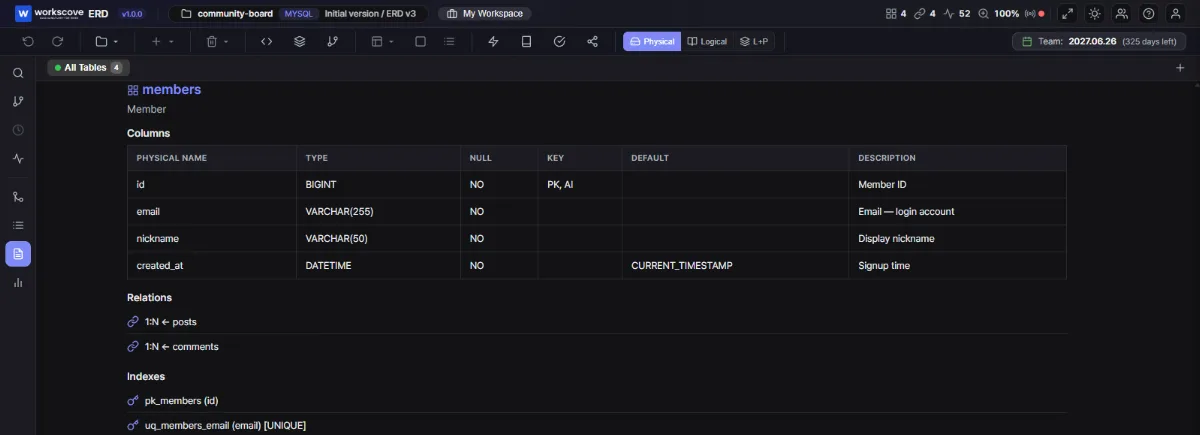
Notice how COMMENT 'Member' became the table's logical name and each column comment landed in the description column. Relations and indexes were read from the schema, so nobody had to type them at all.
Three comment rules worth agreeing on as a team
The quality of the generated document is the quality of your comments. Three small conventions go a long way:
- One format. "Logical name: clarification" as a fixed shape keeps the generated columns consistent and the raw DDL readable.
- Coded values must be spelled out.
status TINYINT COMMENT 'Status: 1=active, 2=dormant, 3=closed'— without that line, the meaning of the codes exists only in someone's memory. - Numbers get units.
amount BIGINT COMMENT 'Payment amount (KRW)'. Whether it's dollars or won, megabytes or gigabytes, is unknowable without the comment.
If you're sitting on an uncommented production database, don't try to comment everything at once. Apply the rules to new and modified tables first, then backfill the core domain — the tables everyone reads, like members and orders.
Updates mean regenerating, not editing
Automatic generation matters most after the schema changes. Regenerating the specification reduces the chance that an older document remains in circulation. The review process can still receive a spreadsheet while its production is automated.
Of the five review items, type mismatches (2), missing FK targets (3) and disagreement with the live database (5) can be reduced through generation. Matching logical names to screen vocabulary (1) and placing an as-of date on the cover (4) still require an agreed writing process.
FAQ
Is a table specification the same thing as a data dictionary?
They overlap heavily. A table specification documents the columns and constraints of each table, while a data dictionary is often broader and covers business terms across the whole system. In most projects the two are used interchangeably — follow whatever your team already calls it.
Does the specification have to be a spreadsheet?
Spreadsheets are convention, not standard. Reviewers and clients often ask for one, so the final deliverable is frequently Excel — but there is no reason to keep the source of truth there. Generate the document from the schema and export to Excel only when you hand it over.
How detailed should column comments be?
One logical name, plus one short clarifying phrase if needed. Two things are non-negotiable though: columns that hold coded values must list what the codes mean (1=active, 2=dormant), and numeric columns must state their unit. Those two habits do more for the document than any amount of long prose.
I need a specification for a database that is already running. Do I write it from scratch?
No. Export the DDL and paste it into an ERD tool, or connect directly if the tool supports reverse engineering. Columns, types, constraints and comments come across as the document. Typing it by hand only adds typos.
Use a template to establish the required fields. Once repeated updates begin, keep the schema as the source and generate the document instead of maintaining the same information by hand.
Normalization applies the next set of decisions to the same forum schema: how far each table should be split.