
Mermaid keeps an ERD for a README or wiki as a text code block. GitHub renders it directly, so there is no separate image file to regenerate and upload after each change.
A forum database demonstrates the erDiagram syntax and relationship symbols. The later sections cover manual layout, DDL conversion and specifications, which Mermaid does not provide itself.
Where the code turns into a picture
Mermaid is a text syntax for diagrams; a renderer turns it into the picture. Most tools you already use ship with one.
- GitHub / GitLab: render ```mermaid code blocks in Markdown automatically. The most common route for an ERD in a README.
- Notion: create a code block and set its language to Mermaid.
- VS Code: install a preview extension like Markdown Preview Mermaid Support and diagrams appear right in the editor.
- mermaid.live: the official online editor. Handy for experimenting with syntax or exporting PNG/SVG.
Nothing to install, no account to create — you write a code block in the document tool you already use. That's Mermaid's biggest charm.
A first diagram: one table
Declare erDiagram, then write each table (entity) in braces. Each line reads "type name key-marker":
erDiagram
  MEMBERS {
    bigint id PK
    varchar email UK
    varchar nickname
    datetime created_at
}PK, FK and UK mark primary, foreign and unique keys, and the block renders as a table-shaped entity box. To attach a description to a column, add it in quotes at the end of the line:
bigint id PK "surrogate key"Parenthesized types like varchar(255) also render fine as of mermaid 10. Renderers bundle their own mermaid versions though, so if an older environment throws an error, dropping the parentheses is the quickest fix.
Reading the relationship symbols
A relationship between two tables is one line:
MEMBERS ||--o{ POSTS : "writes"That reads "one member writes zero or more posts." The symbols look like line noise until you see the structure: the marks at each end are that table's cardinality — inner symbol is the minimum, outer is the maximum.
| Symbol | Meaning |
|---|---|
|| |
exactly one |
|o |
zero or one |
}| |
one or more |
}o |
zero or more |
So the combinations you'll actually use read like this:
||--o{— one to 0..N (the everyday parent-child)||--|{— one to 1..N (when a child must exist)}o--o{— N to M (many-to-many)
The line in the middle carries meaning too: -- (solid) is an identifying relationship, .. (dotted) is non-identifying. Starting out, using solid lines everywhere reads perfectly well — split them when the distinction starts to matter. If the crow's foot system itself is new to you, the ERD notation guide covers it from the basics.
In practice: the whole forum database
Members, categories, posts, comments — the four-table forum in full:
erDiagram
  MEMBERS ||--o{ POSTS : "writes"
  CATEGORIES ||--o{ POSTS : "groups"
  POSTS ||--o{ COMMENTS : "receives"
  MEMBERS ||--o{ COMMENTS : "writes"

  MEMBERS {
    bigint id PK
    varchar email UK
    varchar nickname
  }
  CATEGORIES {
    int id PK
    varchar name UK
  }
  POSTS {
    bigint id PK
    bigint member_id FK
    int category_id FK
    varchar title
  }
  COMMENTS {
    bigint id PK
    bigint post_id FK
    bigint member_id FK
  }
Rendered, it comes out like this:
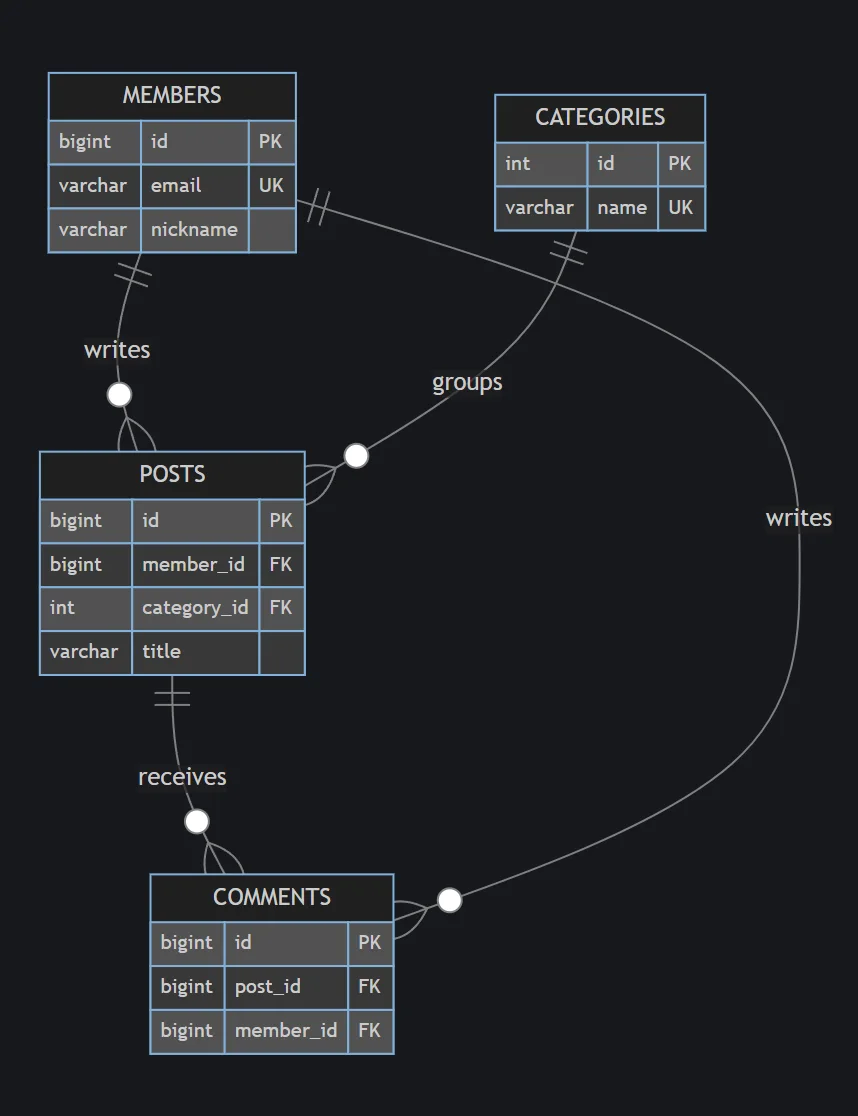
One habit worth copying: relationships at the top, entity definitions below. The skeleton of the diagram — who connects to whom — is readable from the first few lines of code, and when a diff comes in, relationship changes and column changes show up separately.
If you're curious where this forum design came from in the first place (extracting entities, deciding relationships), How to Draw an ERD works through the same example from scratch.
The walls you'll hit
Use Mermaid ERD for real work and a few limits show up quickly. The rendered image above already hints at the first one.
You can't touch the layout. CATEGORIES ended up top-right and COMMENTS at the bottom because Mermaid decided so. There's no dragging tables around; reordering the code shifts the result, but that's not the same as controlling it. Four tables look fine. Past twenty, the lines start tangling — and that's when not being able to fix the layout genuinely hurts.
It can't hold the full schema. NOT NULL, defaults, indexes, CASCADE rules — there's nowhere to write them. Fine for a visual summary; it also means nobody can build the real tables from this code alone.
It doesn't convert to or from SQL. Mermaid has no built-in way to become DDL, nor to be generated from DDL. This is where double bookkeeping begins — the picture and the actual schema each maintained by hand.
No specification document comes out. The table spec that reviews and handovers ask for has to be produced separately.
The division of labor that works
None of this means dropping Mermaid. It means picking a direction: keep the source of truth in DDL, and treat Mermaid as documentation output.
When DDL is the source, it can't drift from the real database — and when a document needs a picture, you generate Mermaid from the DDL. The conversion is a job for AI: paste the DDL, say "convert to erDiagram," done. Converting by hand is not worth anyone's time. Tips for putting AI to work on schemas are in Drawing ERDs with AI.
And when you reach the stage that needs editing, validation, or a spec document — tidying a layout for review, working on the same diagram as a team — that's what dedicated tools are for. Paste DDL into WorksCove ERD and you get an editable diagram, with a table specification generated from the same data. If you want to start from extracting the DDL itself, the process is laid out in SQL to ERD.
FAQ
Where does Mermaid ERD actually render?
GitHub and GitLab render mermaid code blocks in Markdown automatically. Notion renders them if you set the code block language to Mermaid. In VS Code, install a Markdown preview extension. For quick experiments, the official online editor at mermaid.live is the fastest route.
Can I write type lengths like VARCHAR(255)?
Yes — we verified that parenthesized types like varchar(255) render fine on mermaid 10. Renderers bundle different mermaid versions though, so an older environment may throw an error. If a diagram refuses to render, dropping the parentheses is the quickest fix.
Can I move tables around by hand?
No. Mermaid computes the entire layout automatically and has no manual positioning. Changing the order of your code shifts the result somewhat, but there's no way to put a table where you want it. The day you want to tidy the layout is the day to move to a dedicated tool.
Can Mermaid code become real database tables?
Mermaid itself has no SQL export. Run the flow the other way: keep the schema as DDL, and generate Mermaid from the DDL whenever a document needs a picture. That way neither side loses information.
Mermaid fits a lightweight structure diagram maintained in a README. Manual layout, schema validation and specification export require a dedicated ERD tool with those features.