
To generate an ER diagram with AI, give ChatGPT or Claude a description of the service and ask for a schema draft. The useful output is not a picture, though. Ask for DDL in CREATE TABLE statements.
The book-club example below starts with a DDL prompt, turns the response into a diagram, and then checks each validation warning against the target DBMS.
Why DDL, not a picture
Ask an AI to "draw an ERD" and the response is usually an image, Mermaid code, or a table-shaped description. Each works as a preview but carries less schema information than DDL.
An image can't be edited — changing one column means regenerating everything. Mermaid embeds nicely in docs, but its syntax can't express much about types and constraints, and turning it into a real database means writing the DDL yourself after all.
DDL does not have that problem. CREATE TABLE statements are an executable artifact in their own right: paste them into an ERD tool and you have a diagram, run them against a database and you have real tables. DDL is the format that lets AI output flow onward to wherever you need it.
What a good prompt looks like
Output quality tracks prompt quality closely. Vague requests get vague schemas.
I'm building a book club management service.

- Members can create reading groups and join them
- Each group picks one book per month
- Members leave a rating (1-5) and a review for books they've read

Design a MySQL schema for this.

Requirements:
- Reply with CREATE TABLE statements only
- Add a COMMENT to every table and column
- Declare FKs with explicit CONSTRAINT clauses
- Use BIGINT AUTO_INCREMENT surrogate keys for PKs
Three things are doing the work here. Requirements written as plain sentences (that's where the AI extracts entities and relationships), the output format pinned to DDL, and quality conditions made explicit: COMMENT, FK, PK. The COMMENT condition especially: it's what keeps column descriptions alive later in your diagram and spec documents.
Always name the DBMS, too. MySQL and PostgreSQL differ in types and syntax, and without a target you sometimes get a mix of both that runs on neither.
Some things are better left out. Qualifiers like "production-grade" or "perfect" barely change the result. One concrete business rule beats them all: add "reviews survive when a member deletes their account" and the AI starts reasoning about delete policies and NULLs on its own.
If your requirements aren't written down yet, that's also a job for the conversation: start with "what data would a book club service need?", shape the list together, then request DDL in the format above.
From DDL to diagram
The DDL that came back from the prompt above starts like this:
CREATE TABLE members (
  id               BIGINT AUTO_INCREMENT PRIMARY KEY,
  email            VARCHAR(255) NOT NULL UNIQUE COMMENT 'Login account',
  nickname         VARCHAR(50)  NOT NULL COMMENT 'Display name',
  current_group_id BIGINT NULL COMMENT 'Current active group',
  joined_at        DATETIME NOT NULL DEFAULT CURRENT_TIMESTAMP COMMENT 'Joined at'
) COMMENT='Members';

CREATE TABLE reading_groups (
  id         BIGINT AUTO_INCREMENT PRIMARY KEY,
  owner_id   BIGINT NOT NULL COMMENT 'Group owner',
  name       VARCHAR(100) NOT NULL COMMENT 'Group name',
  created_at DATETIME NOT NULL DEFAULT CURRENT_TIMESTAMP COMMENT 'Created at',
  CONSTRAINT fk_groups_owner FOREIGN KEY (owner_id) REFERENCES members (id)
) COMMENT='Reading groups';
Five tables in total with books, group_books and reviews — at first glance, nothing to complain about. Paste it into WorksCove ERD's SQL schema import and the diagram appears with every relationship line connected. Structure you couldn't see in text suddenly is visible. If the symbols on the relationship lines are unfamiliar, the ERD notation guide has them. The import flow itself is covered step by step in SQL to ERD.
The step that actually matters: verifying AI output
AI-generated schemas tend to have the same strengths and gaps. They identify entities and basic relationships quickly, but often omit operational rules and DBMS-specific details.
Here's the book club schema above, run through automated validation:
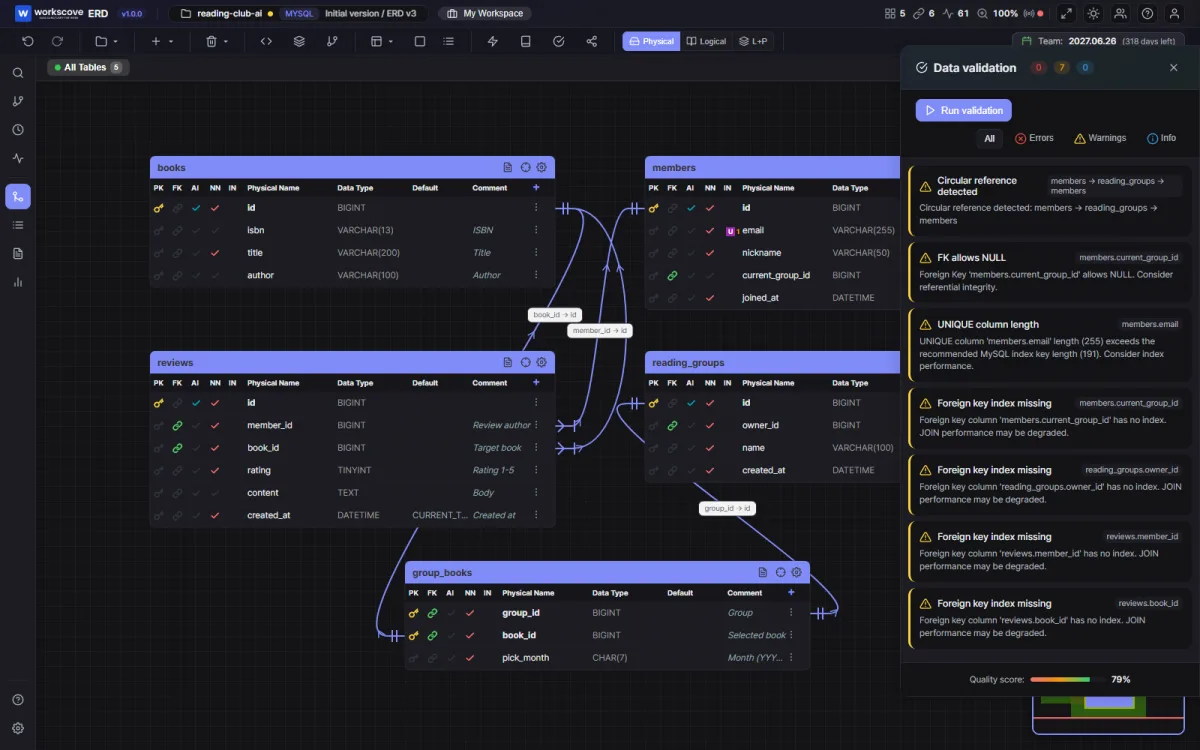
The validator reports seven warnings. A warning is not proof of an error; each item still has to be checked against the target DBMS and the actual DDL.
Circular reference. members.current_group_id points at reading_groups, while reading_groups.owner_id points back at members. Because current_group_id is nullable in this example, insertion is possible in stages: create the member, create the group, then update the member. The real modeling gap is that "members can join groups" needs a separate group_members table. Whether to cache a current group in another column is a business and consistency decision, not an automatic error.
Check FK indexes. MySQL InnoDB, the target in this example, automatically creates an index on the referencing columns when an FK needs one. A missing explicit INDEX clause is therefore not proof that the index is absent. Other systems, including PostgreSQL, do not create a referencing-side index just from an FK declaration, so check the actual indexes and query patterns for the target DBMS.
UNIQUE column length. The familiar "191 characters under utf8mb4" limit comes from older InnoDB row formats with a 767-byte key limit. With the current default DYNAMIC row format and its 3,072-byte limit, VARCHAR(255) needs at most 1,020 bytes and can be indexed as UNIQUE. Check the server version and row format instead of shortening every such column automatically.
Beyond these three, a few more types keep showing up across AI schemas:
- It invents constraints the requirements never stated. The rating column lands as
TINYINTbut the 1-5 range check is missing — or the opposite, a CHECK constraint nobody asked for appears. Decisions you didn't make are sitting in your schema, so read it line by line. - Similar columns get different types in different tables. One table's name column is
VARCHAR(50), another's isVARCHAR(100). A human team catches this with conventions; AI generates table by table, so cross-table consistency is weak. - Delete policies are simply absent. In this MySQL example, omitting ON DELETE produces the same rejecting behavior as RESTRICT. Other DBMSs may name the default NO ACTION and differ in details, so state the intended parent-delete behavior for the actual target instead of treating RESTRICT as a universal default.
Catching all of this by eye is hard. WorksCove ERD's data validation checks 25 items automatically — circular references, missing indexes, reserved words, type validity and more — and rolls them up into a quality score. The more design you delegate to AI, the more this verification step is worth. AI made drafting fast; deciding whether the draft can be trusted is still the job of people and tools.
Feeding warnings back to the AI
Return the validation warnings to the AI and the loop closes. We took the circular reference warning above and asked:
This schema has a circular reference between
members.current_group_id and reading_groups. Remove the
current_group_id column and redesign it with a separate
membership history table.
The revision that came back:
CREATE TABLE group_members (
  group_id  BIGINT NOT NULL COMMENT 'Group',
  member_id BIGINT NOT NULL COMMENT 'Member',
  joined_at DATETIME NOT NULL DEFAULT CURRENT_TIMESTAMP COMMENT 'Joined at',
  PRIMARY KEY (group_id, member_id),
  CONSTRAINT fk_gm_group  FOREIGN KEY (group_id)  REFERENCES reading_groups (id),
  CONSTRAINT fk_gm_member FOREIGN KEY (member_id) REFERENCES members (id)
) COMMENT='Group membership';
The cycle is gone — and "can a member join several groups?", a question the original schema fudged, now has an answer. Re-importing the revised DDL and re-running validation takes minutes. The design → verify → revise loop spins much faster than it ever did between humans alone.
If you want Mermaid instead
If the goal is a diagram embedded in a README or docs, asking for Mermaid works too:
erDiagram
  MEMBERS ||--o{ REVIEWS : "writes"
  BOOKS   ||--o{ REVIEWS : "receives"
  READING_GROUPS ||--o{ GROUP_BOOKS : "picks"
It renders right inside Markdown, which is plenty for lightweight sharing. But it can't carry types, indexes or comments, and getting from here to a real database means producing DDL after all. So flip the order: get DDL first, convert to Mermaid when you need it. The other direction loses information.
Prompts for when a database already exists
AI isn't just for greenfield design — it's just as useful against a database that already exists. The key is feeding it the current schema as material.
Designing tables for a new feature. Paste your current DDL and ask "what tables would a coupon feature need? Follow the existing naming conventions." The proposal comes back matching your snake_case, your prefixes, your style — a different level of quality than asking without the schema.
Reviewing existing structure. "Where will this schema hurt once data accumulates?" gets you opinions on normalization and indexing. Treat them as opinions, though — they complement automated validation rather than replace it.
If exporting your current DDL sounds like a chore, step 1 of SQL to ERD collects the commands per DBMS. One line of mysqldump does it.
The division of labor, summarized
What to hand the AI, and what to keep for people and tools:
- AI: drafting a schema from requirements, revising it against validation warnings, proposing tables for new features on an existing schema
- People and tools: reading the diagram, catching defects with automated validation, judging whether business rules (delete policies, NULLs) match what the service actually needs
For the underlying design steps, How to Draw an ERD starts with choosing entities and relationships. AI shortens the drafting stage, but reviewing and correcting the result still requires those fundamentals.
FAQ
Can I use an AI-designed schema as is?
It makes an excellent draft, but putting it straight into production isn't advisable. AI gets relationships and normalization mostly right, while quietly missing the things that hurt in operation — circular references, missing indexes, questionable type choices. Turn it into a diagram, look at it, run automated validation, then use it.
Which AI is best at ERDs?
Any recent conversational model handles schema design at this scale without much trouble. What moves quality far more than model choice: how concretely you state the requirements, whether you pin the output format to DDL, and whether you verify what comes back.
What about getting an image or Mermaid instead?
Mermaid is fine if the goal is a diagram embedded in documentation. But images and Mermaid are hard to edit or carry into a spec afterward. DDL flows on to diagram tools, databases and documents alike, so it's the better default — you can always convert DDL to Mermaid later, while the reverse loses information.
Is AI useful when a database already exists?
Yes — for designing tables for a new feature, or reviewing the current structure. Paste the current schema DDL and ask something like ‘what tables would a coupon feature need, following these conventions?’ and the proposal will match your existing naming and style.